


Most events quietly face the same problem. You invest time, money, design hours, and internal pressure into building an app. You promote it everywhere. You push it through reminders, QR codes, and pre-event emails. And still, the majority of attendees walk into your venue without downloading it.
Across the industry, event app adoption hovers around 25 percent. That means three out of four attendees start the day without the one tool meant to guide them.
The impact is real: weaker sponsor ROI, lower session turnout, frustrated attendees wandering lost, and your team stuck answering the same questions all day. Without a reliable channel to reach people, you lose the ability to guide, inform, and deliver the experience you planned.
This isn’t a failure of creativity or engineering. It is a behavior mismatch. People simply do not want another app. They want a smoother experience delivered through channels they already use several times a day.
That is why AI event assistants running inside messaging platforms are beginning to outperform traditional apps on nearly every metric.
The Real Reasons Event Apps Fail
Event teams already know the pattern, but it’s worth walking through what actually happens.
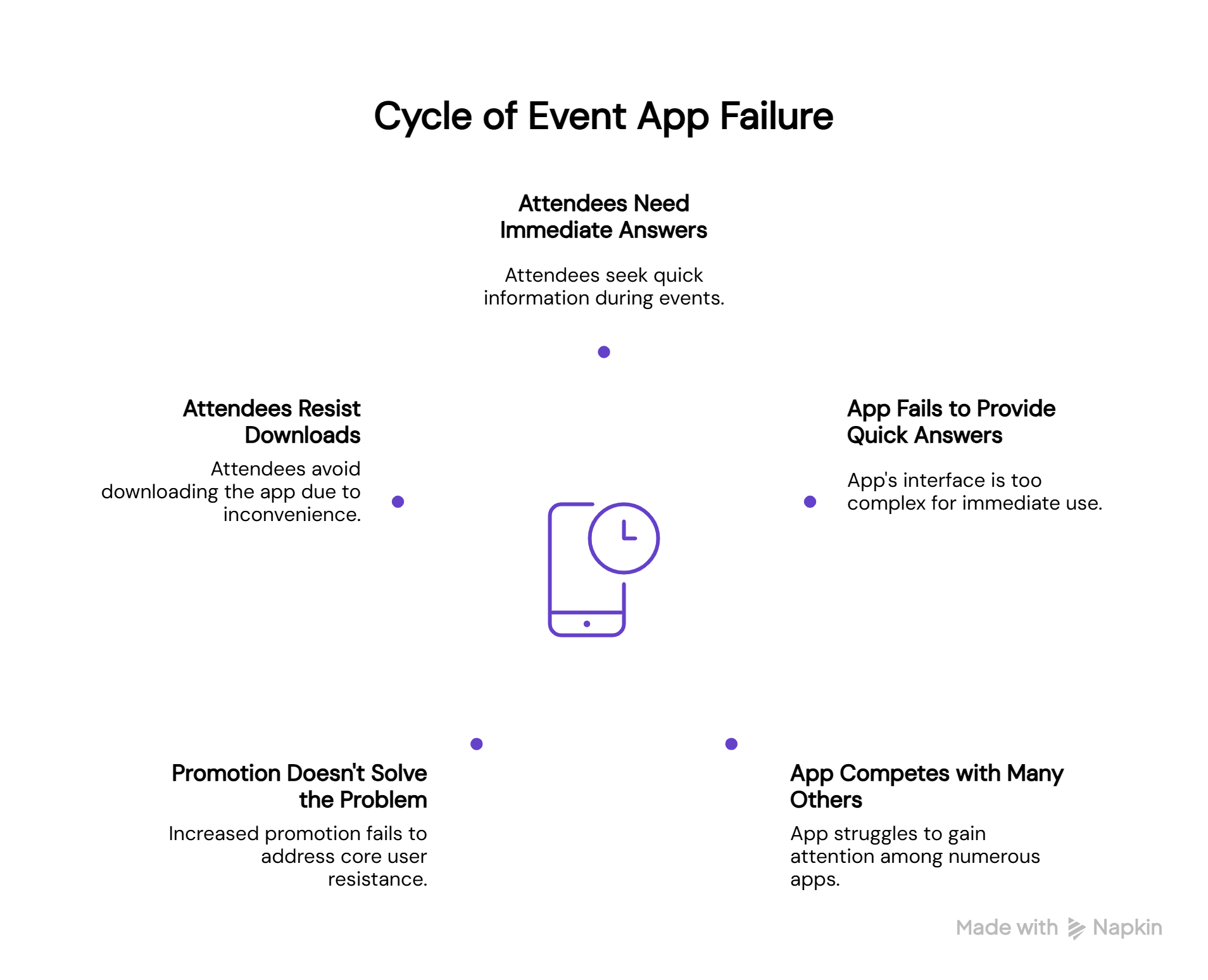
1. Attendees need answers now, not three taps later
Even if they do download it, the timing works against you. Crowded foyers, overlapping sessions, and frantic schedules don’t leave room for exploring menus. When someone needs to know which hall their workshop is in or how far a booth is from where they’re standing, they want an immediate answer. Apps bury these answers too deep.
2. Your app is competing with 80 others (and losing)
Attendees are drowning in apps. The average smartphone holds over 80 apps, but people only engage with about 9 daily and 30 monthly. A temporary event app doesn’t stand a chance of breaking into that rotation. There’s no habit loop or daily anchor, basically, nothing that makes someone wake up and check it. Notifications get muted or ignored within hours.
3. More promotion doesn’t solve the core problem
So organizers double down. More QR codes. More emails. More announcements from the stage. But none of this changes the core issue: people resist downloads, and no amount of promotion fixes a behavior mismatch. The app isn’t failing because it’s poorly designed. It’s failing because it asks attendees to do something they’ve already decided they don’t want to do.
This is why the shift toward messaging-first interactions is gaining momentum.
What Event Teams Actually Deal With
While attendees ignore the app, the real pressure falls on the event teams who built everything behind it. The problem is not just low adoption. It is the operational drain that happens when months of work fail to reach the people who need it.
Months of content creation that never reaches the audience
Teams spend weeks preparing information that should have made the event effortless: FAQs, maps, speaker bios, session guides, venue instructions, exhibitor lists, safety notes, shuttle details, dining options, and every possible contingency. This content is accurate, detailed, and ready to be used. But when most attendees skip the app, all of it gets buried.
The result is painful: the work is not the problem, but the distribution channel sure is.
Your team becomes the default help desk
Instead of managing sponsors, optimizing session flow, or tracking real-time changes, staff members spend the entire day answering the same questions repeatedly.
- “Where is Hall C”
- “What time is the keynote”
- “How do I reach the expo”
- “Is lunch in Hall B or Hall D”
Every answer already exists in the assets your team built. But because the app never became the central source of truth, the responsibility lands back on humans. That means constant interruptions, stretched staff, and no space for higher-value work.
A communication channel that doesn’t match attendee behavior
The real problem is not the effort put into creating content. The problem is the gap between where teams publish information and where attendees actually consume information.
Event apps demand a behavior shift. Messaging apps fit into existing behaviour.
Your content gets lost not because it lacks clarity, but because it lives in a place people don’t open. The team ends up firefighting logistics instead of delivering the experience they carefully planned months in advance.
So, why does this hurt your event outcome?
When teams cannot rely on a central channel, everything slows down. Updates take longer to circulate. Miscommunication grows. Crowds move unpredictably. Speaker changes become harder to manage. Sponsor value drops because footfall cannot be guided.
The entire event becomes reactive instead of intentional.
And this is where messaging-first AI assistants change the equation. They do not just help attendees. They protect the time, effort, and sanity of the event teams who make the whole experience possible.
Messaging-First is becoming the event experience
Messaging platforms have become the default way people communicate, plan, and get information. This isn’t just a trend. It’s a behavioral shift that events can directly benefit from.
WhatsApp alone has over 3 billion monthly active users, and 83% of them open the app at least once per day. For many attendees, WhatsApp is the first app they check in the morning and the last one they close at night. It is already the center of their personal and professional communication.
This gives event teams something incredibly valuable: the primary engagement channel is already in the attendee’s pocket. You don’t need to teach them a new interface, push them into an app store, or rely on notifications they will eventually mute. You just need to place your event inside the channel they already trust and use constantly.
And the numbers make this shift impossible to ignore:
Traditional apps
- Download rates usually sit between 20–30%.
- 56% of mobile apps are deleted within 7 days, often because of storage issues, complicated onboarding, or notification fatigue.
- Push notification opt-in rates dropped to 38% in 2025, reflecting growing resistance toward interruptions.
Messaging-first AI assistants
- WhatsApp messages achieve up to a 98% open rate, compared to roughly 20% for email.
- Click-through rates on WhatsApp frequently land between 45–60%, significantly outperforming standard digital channels.
- 70% of businesses using WhatsApp chatbots report higher customer satisfaction because responses feel immediate and natural.
The difference is simple: apps demand a new habit; messaging aligns with an existing one. AI assistants seamlessly fit into how attendees already communicate, which makes adoption automatic rather than forced.
This is why messaging-first interactions are quickly becoming the foundation of modern event engagement. They reduce friction, improve communication, and give event teams a channel they can finally rely on.
What AI Event Assistants Actually Deliver (that your app couldn’t)
Through Bridged’s Knowledge Agent, you can turn your event experience into a conversational assistant that runs inside:
- Web
- App
The assistant is trained on:
- FAQs
- Agenda documents
- Speaker bios
- Exhibitor lists
- Venue maps
- Logistics guides
It becomes an always-available guide who talks the way attendees talk and responds faster than any support desk. And that too without any downloads, frustration, or learning curve.
What These AI Assistants Can Do
AI assistants reshape the attendee journey by removing friction. They respond instantly, personalize recommendations, and centralize everything inside one chat window. The more attendees use them, the smoother the event becomes.
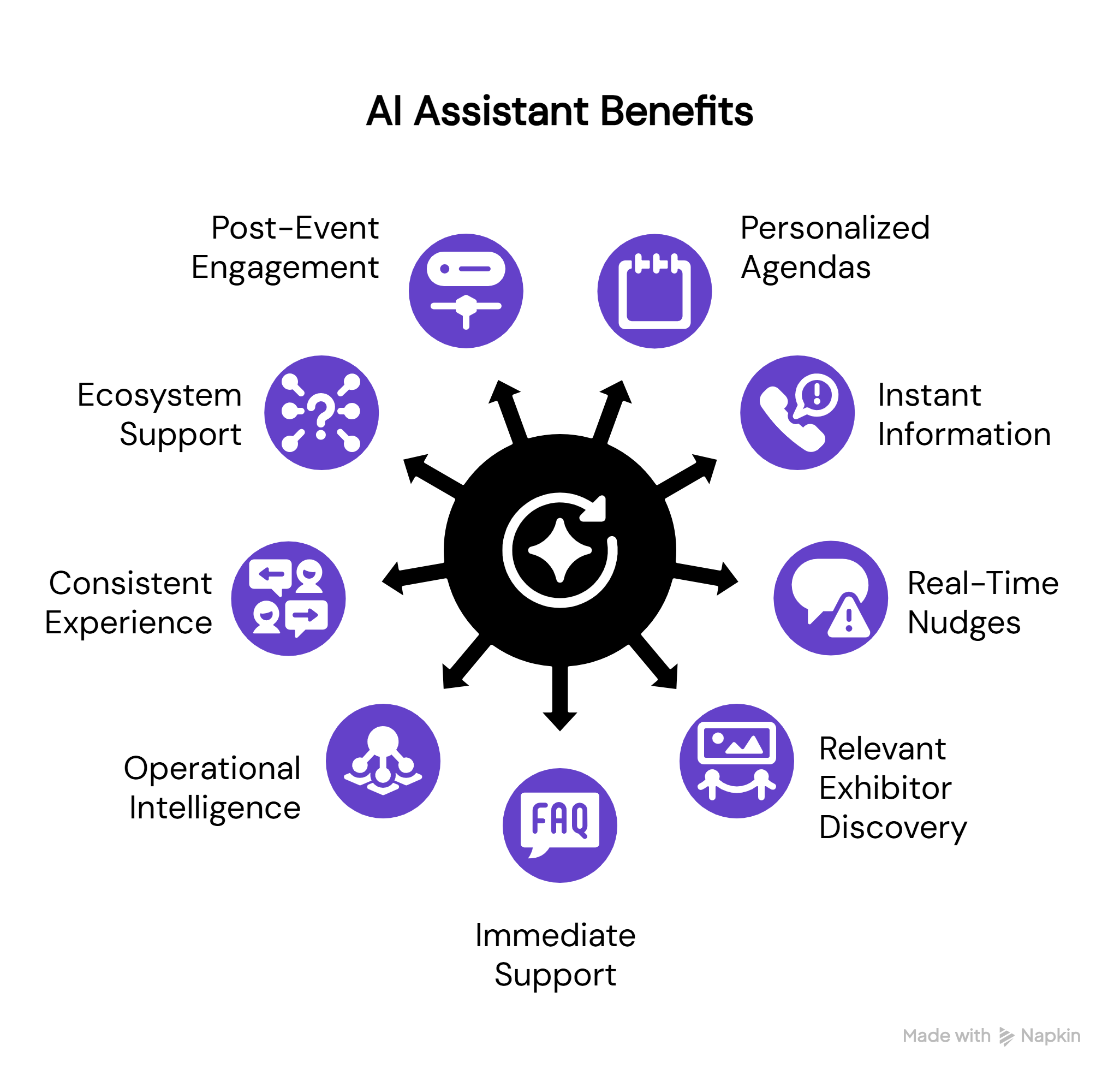
1. Build personal agendas that people actually follow
Instead of scrolling through endless lists, attendees can tell the assistant what they care about and receive a ready-to-use agenda. The process is conversational:
- “Help me plan my Thursday.”
- “Suggest sessions in the sustainability track.”
- “I am free at 3 PM. What can I attend?”
The assistant also sends reminders that people actually open because they arrive inside messaging apps they check constantly. This creates higher attendance and reduces confusion inside the venue.
2. Share speaker, session, and venue info instantly
Session pages are usually buried deep inside event apps. AI assistants bring everything into one place. Attendees can request speaker profiles, session descriptions, locations, hall numbers, and track details. They can also ask follow-up questions like “Is this workshop suitable for beginners?” or “When and where will the ‘AI in media’ session take place?” Information retrieval becomes a quick conversation rather than a scavenger hunt.
3. Deliver real-time nudges that people don’t ignore
Traditional push notifications lose relevance almost immediately. With average open rates at just 7.8%, and nearly 46% of users opting out after 2-5 messages per week, most event app alerts barely register. Messaging notifications are different. WhatsApp messages have a 98% open rate, nearly five times higher than email and SMS combined. Messages sent via WhatsApp API achieve 80% open rates within the first five minutes.
Instead of relying on static app alerts, AI assistants send timely nudges inside a channel attendees already monitor. A short message can guide someone to their next session, inform them about a hall change, or help them navigate a crowd spike without disrupting the flow of the event.
Even operational changes that usually create bottlenecks become easier to manage. If lunch shifts to a different area, if a speaker is delayed, or if a shuttle route changes, the assistant communicates it instantly in a place attendees will actually see. The event feels smoother because updates travel faster than the problems they’re meant to solve.
These nudges create a steady, almost invisible rhythm across the venue. People move where they need to be, confusion drops, and the pressure on your on-ground staff reduces significantly.
4. Help attendees discover relevant exhibitors and booths
For expo-heavy events, this becomes one of the most valuable features. Attendees can ask “Show me all exhibitors working in EV technology” or “Which booths should I visit for fintech demos?” The assistant filters, curates, and guides. Exhibitors benefit because interested attendees find them faster rather than wandering through the hall.
5. Solve every common support query immediately
Support desks get overwhelmed with repetitive questions:
- Badge help
- Venue entrances
- Shuttle timings
- Wi-Fi details
- Registration clarifications
AI assistants handle them instantly, freeing up your staff. If something changes, organizers update the assistant once. Every attendee receives accurate answers in real time.
6. Give organizers real-time operational intelligence
AI assistants collect patterns from thousands of conversations. Organizers see trending questions, potential bottlenecks, session interest indicators, queue patterns, and booth-level demand. These signals help teams react quickly and keep the event running smoothly.
7. Create a consistent, human-like experience at scale
Attendees feel supported, guided, less stressed, more confident, and better informed. The event feels personal, even if thousands of people are inside the venue.
8. Support exhibitors, speakers, and sponsors too
AI assistants work for more than just attendees. They can help exhibitors update info, give sponsors performance visibility, help speakers with reminders, share guidelines quickly, and assist with logistics. The overall ecosystem of the event improves, not just the attendee side.
9. Keep engagement alive after the event ends
Most apps lose relevance the moment the event ends. Messaging assistants do the opposite. They help with session recordings, slide decks, key takeaways, feedback, certificates, photo galleries, and upcoming announcements. Your event continues for days without any friction.
What This Means For Product, Marketing, and Ops Teams
Product teams
- No heavy app development
- Faster iterations
- Better user behavior data
- Clearer feedback loops
Marketing teams
- Higher session turnout
- Better sponsor visibility
- More UGC
- Stronger community building
Ops teams
- Shorter queues
- Smoother movement across halls
- Fewer repeated questions
- Quicker response during unexpected changes
Every team benefits because friction drops across the board.
A Messaging-First Event Experience In Practice
Imagine an attendee walking into your event. At the entrance, they scan a QR code and a WhatsApp chat opens right away. Without any app store or sign-up screens, they’re simply in. They send a quick message asking to plan their day, and the assistant puts together a schedule that actually feels usable.
As they move through the venue, reminders pop up at the right moments. If they’re looking for a booth or trying to figure out where their next session is, they just ask. Directions, updates, and small fixes, everything comes through the same chat window they already rely on. There’s no hopping between tabs or digging through menus.
By the time they leave, they’ve had a smooth, guided experience without ever feeling like they were trying to “learn” a new tool. It feels natural, almost invisible, and that’s the point.
How Bridged Helps You Move To This Model
Bridged’s Knowledge Agent is built for publishers and event organizers who want to reduce operational chaos and increase participation. They use your content, learn your event, and deliver a messaging-first experience inside the apps people already trust.
Bridged’s AI agents have helped leading organizations improve engagement, output, and user satisfaction across multiple products and formats .
You get:
- Faster deployment
- Higher engagement
- Better CSAT
- Lower operational pressure
- A smoother event
All without convincing attendees to download anything.
If you liked this, you’ll probably like these as well
Discover how AI-powered tools like live polls, Q&A, and sentiment analysis turn passive viewers into active contributors, and why sessions run 18-20% longer when you do.
The stats don’t lie: attendees expect modern tech and immersive experiences. Here’s how event teams are meeting those expectations with AI.
Some publishers are pulling in 30% of their revenue from events. This piece breaks down what’s working and why.
Move beyond badge scans and booth anecdotes. Learn how to turn attendee behavior into qualified leads and attributed revenue.
FAQs
- Why do event apps struggle with adoption?
The process is lengthy, motivation is low, and people avoid adding temporary apps to their devices. - What is a messaging-first event experience?
The entire event runs through WhatsApp, Telegram, or similar channels instead of a standalone app. - How does an AI event assistant work?
It is trained on your event information and answers attendee questions in real time. - Can an AI assistant replace a traditional event app?
Yes. It handles agendas, reminders, support, Q&A, polls, exhibitor search, and live updates. - Do attendees engage more with messaging assistants?
Yes. Messaging assistants typically see 2 to 3 times higher engagement than apps. - Do organizers need to build anything custom?
Yes, but in a way that works to their advantage. The assistant doesn’t require heavy development or technical setup, but teams can use Bridged’s AI Lab to create event-specific engines that shape how the assistant responds. Inside the AI Lab, organizers can fine-tune answering guidelines, set fallback responses, define user intent, and teach the assistant how to speak in the tone and structure that fits each event. This gives them full control over the experience without needing to build a new system from scratch. The result is a highly personalized assistant that feels tailored to the event, the audience, and the brand, a level of customization traditional apps rarely achieve.